In today’s fast-paced digital environment, a visual workflow builder is no longer a luxury—it’s a necessity for organizations aiming to scale business process automation (BPA) without increasing complexity. Traditional automation approaches often require deep coding expertise, long development cycles, and frequent maintenance bottlenecks.
At Toptest Global, based on our experience delivering 100+ automation and software QA projects across Singapore and Hanoi, we’ve seen how low code workflow automation transforms operational efficiency. However, the real breakthrough comes when visual automation is combined with QA-driven workflow automation—ensuring reliability, scalability, and zero bottlenecks.
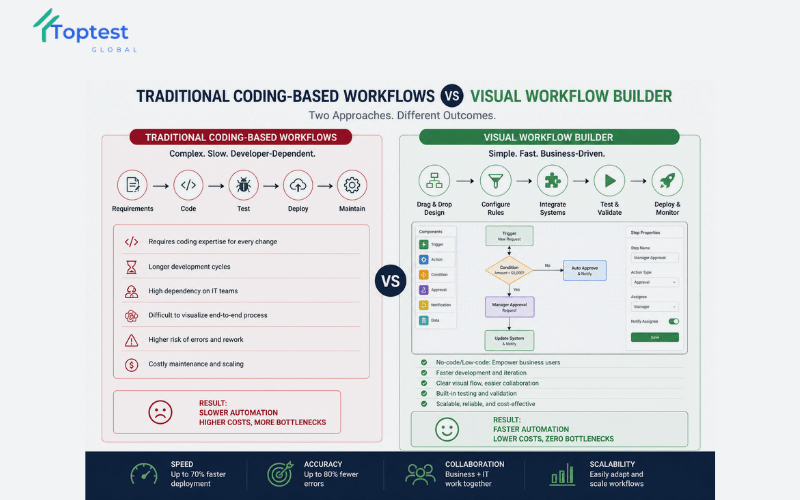
Why Traditional Workflow Automation Fails to Deliver at Scale
Many organizations invest in process automation software expecting instant efficiency gains. Yet, they often encounter hidden challenges that slow down adoption and reduce ROI.
Common Limitations of Traditional Automation
- Heavy reliance on developers for every workflow change
- Lack of visibility across workflow processes
- High error rates due to insufficient QA validation
- Poor scalability in enterprise BPM software environments
Without a visual workflow builder, teams struggle to adapt workflows quickly, especially in dynamic environments like HR process automation or automated purchase order approval systems.
The Rise of Visual Workflow Builder in Low Code Workflow Automation
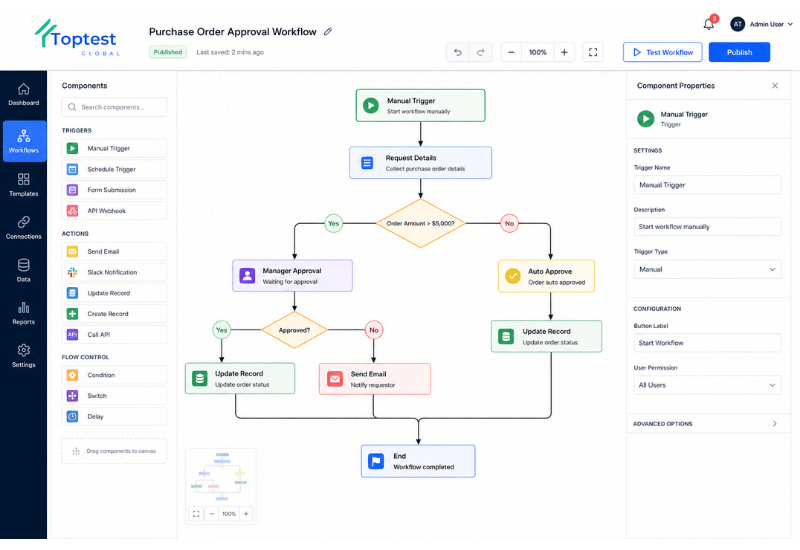
A visual workflow builder enables teams to design workflows using drag-and-drop interfaces, eliminating the need for extensive coding while improving clarity and collaboration.
Key Capabilities of Visual Workflow Builders
- Drag-and-drop workflow design
- Real-time workflow visualization
- Seamless integration with tools like n8n integration and Cflow integration
- Built-in business rules engine support
- Support for BPMN process mapping
This approach empowers both technical and non-technical users to participate in digital process automation, significantly accelerating deployment cycles.
The QA-Driven Automation Advantage: Achieving Zero Bottlenecks
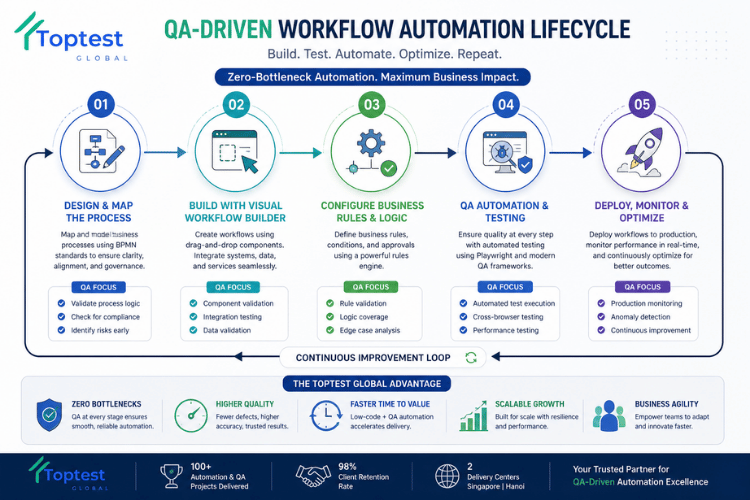
In our 100+ automation and QA projects, we’ve identified a critical gap in most automation implementations: lack of robust software QA automation.
At Toptest Global, we apply a QA-driven workflow automation approach, combining workflow automation with automated QA testing software using frameworks like Playwright automation.
Why QA is the Missing Layer in Workflow Automation
- Prevents workflow failures before deployment
- Ensures data accuracy across automated processes
- Maintains system integrity during scaling
- Eliminates bottlenecks caused by untested workflows
This is how we consistently deliver zero-bottleneck automation for enterprise clients with a 98% retention rate.
How a Visual Workflow Builder Works (Step-by-Step Framework)
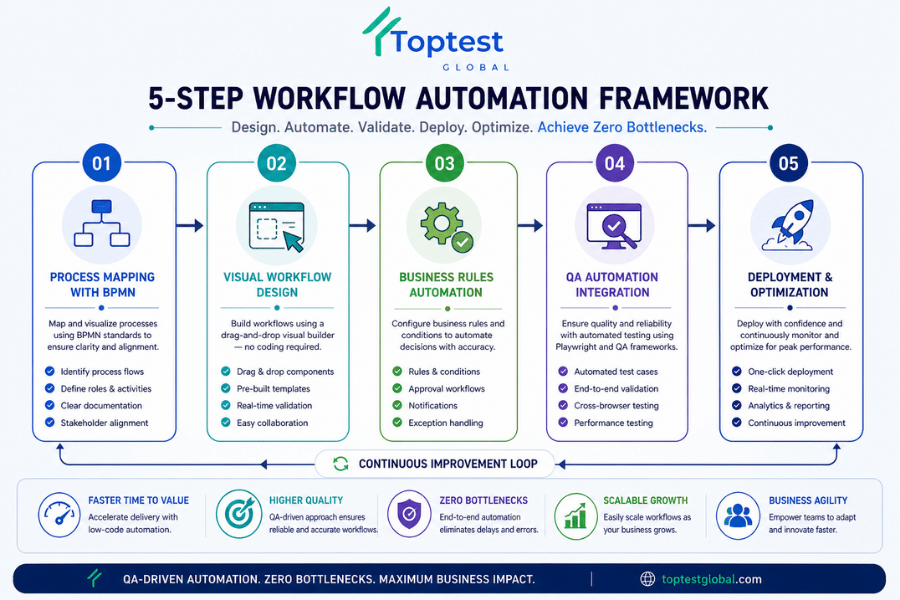
A structured approach ensures maximum efficiency when implementing a visual workflow builder.
Step 1: Process Mapping with BPMN
Define workflows using BPMN process mapping to ensure clarity and alignment across teams.
Step 2: Drag-and-Drop Workflow Design
Use a visual workflow builder to create workflows without coding, integrating tools like n8n or Cflow.
Step 3: Business Rules Configuration
Implement a business rules engine to automate decision-making processes.
Step 4: QA Automation Integration
Apply automated QA testing software to validate workflows using Playwright automation frameworks.
Step 5: Deployment & Monitoring
Deploy workflows and continuously monitor performance using workflow management software.
Real-World Use Cases Across Industries
Visual workflow builders are transforming operations across multiple business functions.
Top Use Cases
- Automated employee onboarding – Streamline HR process automation
- Client onboarding automation – Improve customer experience
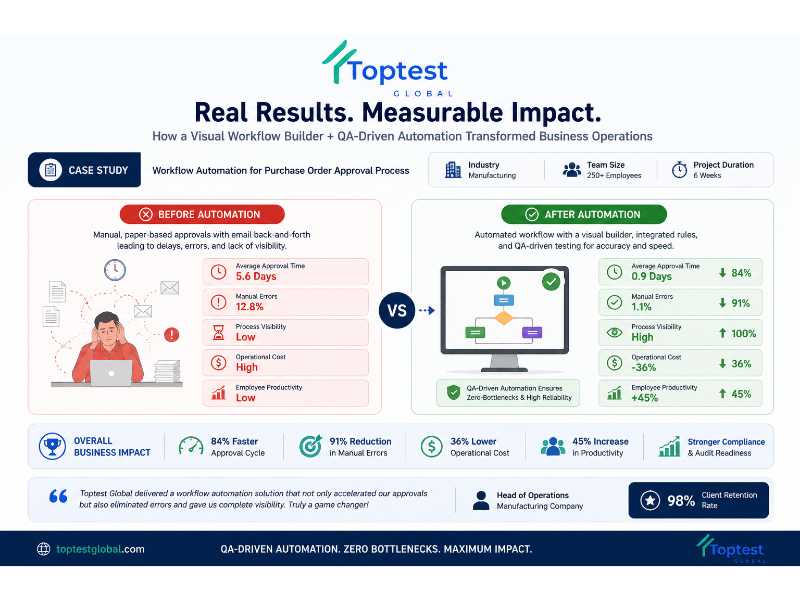
- Automated purchase order approval – Reduce delays in finance workflows
- Process automation in software project management – Enhance delivery efficiency, more information in: Cflow automation workflow
In our development centers, we’ve implemented scalable BPM software solutions that reduced processing time by up to 60% while eliminating manual errors.
Visual Workflow Builder vs Traditional Automation Tools
| Feature | Visual Workflow Builder | Traditional Automation |
|---|---|---|
| Ease of Use | High (drag-and-drop) | Low (coding required) |
| Speed of Deployment | Fast | Slow |
| Error Rate | Low (QA-driven) | High |
| Scalability | High | Limited |
| Maintenance | Simple | Complex |
Implementation Best Practices for Scalable Automation
To maximize the value of a visual workflow builder, organizations should follow proven best practices.
- Start with high-impact workflows (e.g., onboarding, approvals)
- Adopt BPMN standards for clarity
- Integrate QA automation from day one
- Use scalable platforms like n8n or Cflow
- Continuously monitor and optimize workflows
For deeper insights, explore our workflow automation fundamentals guide and process automation software strategies.
Results & ROI: What Businesses Can Expect
Organizations implementing QA-driven low code workflow automation typically achieve:
- 50–70% faster process execution
- Up to 80% reduction in manual errors
- Improved cross-team collaboration
- Scalable digital process automation infrastructure
External research from Gartner BPM insights and standards from BPMN.org confirm that visual automation significantly accelerates digital transformation.
Conclusion: The Future of Automation is Visual and QA-Driven
A visual workflow builder is the foundation of modern workflow automation—but without QA, it’s incomplete. The real competitive advantage lies in combining low code workflow automation with robust software QA automation to ensure reliability and scalability.
At Toptest Global, we specialize in delivering QA-driven workflow automation solutions that eliminate bottlenecks and enable true business agility.
👉 Book a Free 45-minute Automation & QA Audit and discover how to transform your workflows into scalable, zero-error systems.
Frequently Asked Questions
What is a visual workflow builder?
A visual workflow builder is a drag-and-drop tool that allows users to design and automate workflows without coding, improving efficiency and transparency.
How does low code workflow automation benefit businesses?
It reduces development time, minimizes dependency on developers, and accelerates digital process automation across departments.
Why is QA important in workflow automation?
QA ensures workflows function correctly, prevents errors, and enables scalable, reliable automation.
Which tools support visual workflow builders?
Popular tools include n8n, Cflow, and enterprise BPM software platforms with workflow management capabilities.
What industries benefit most from workflow automation?
Industries like HR, finance, SaaS, and logistics benefit significantly from automated onboarding, approvals, and process management.