Business workflow automation is the operational backbone of every high-performing organization in 2026 — but selecting the wrong workflow management system (WMS) to power it can set your entire business workflow automation program back by months, or generate technical debt that compounds quietly for years. In our 100+ automation and QA projects, we’ve seen capable teams invest heavily in the wrong platform — not because they lacked intent, but because they didn’t have a structured framework for evaluation before making the decision.
This guide gives you that framework. We’ll walk through the real criteria that separate high-performing workflow management systems from ones that look impressive in demos but underperform in production — and we’ll explain why embedding software QA automation into your selection process is the factor most vendors won’t tell you about, but that determines whether your automation actually delivers zero-bottleneck operations at scale.
Why Most Business Workflow Automation Platform Selections Go Wrong
The business workflow automation software market is crowded, and vendor marketing is sophisticated. Most WMS evaluations go wrong because teams optimize for the wrong signals: polished demos, feature checklists, and price points — rather than the operational realities that emerge at scale.
Here are the patterns we see repeatedly in organizations that have already made a poor WMS selection:
- Automation built on brittle integrations — the platform connects to your tools on day one, but the integrations break silently when APIs update or data schemas change, and there’s no built-in error handling to catch it
- No-code promises that require developers — the visual workflow builder handles basic use cases cleanly but requires engineering support the moment business logic gets complex
- Process visibility gaps — the system runs workflows but provides no meaningful insight into where tasks are stalling, what the throughput looks like, or where SLAs are being missed
- Zero QA layer — the WMS was deployed without a testing strategy, so errors propagate at machine speed and no one notices until a compliance audit or a client escalation surfaces the problem
- Vendor lock-in with no migration path — proprietary workflow formats and closed APIs make it expensive and painful to change platforms as requirements evolve
The right selection process avoids all of these outcomes. It starts not with a vendor shortlist, but with a clear internal view of your process landscape, your integration requirements, and your QA governance expectations.
The 6 Evaluation Dimensions Every Business Workflow Automation Platform Must Pass
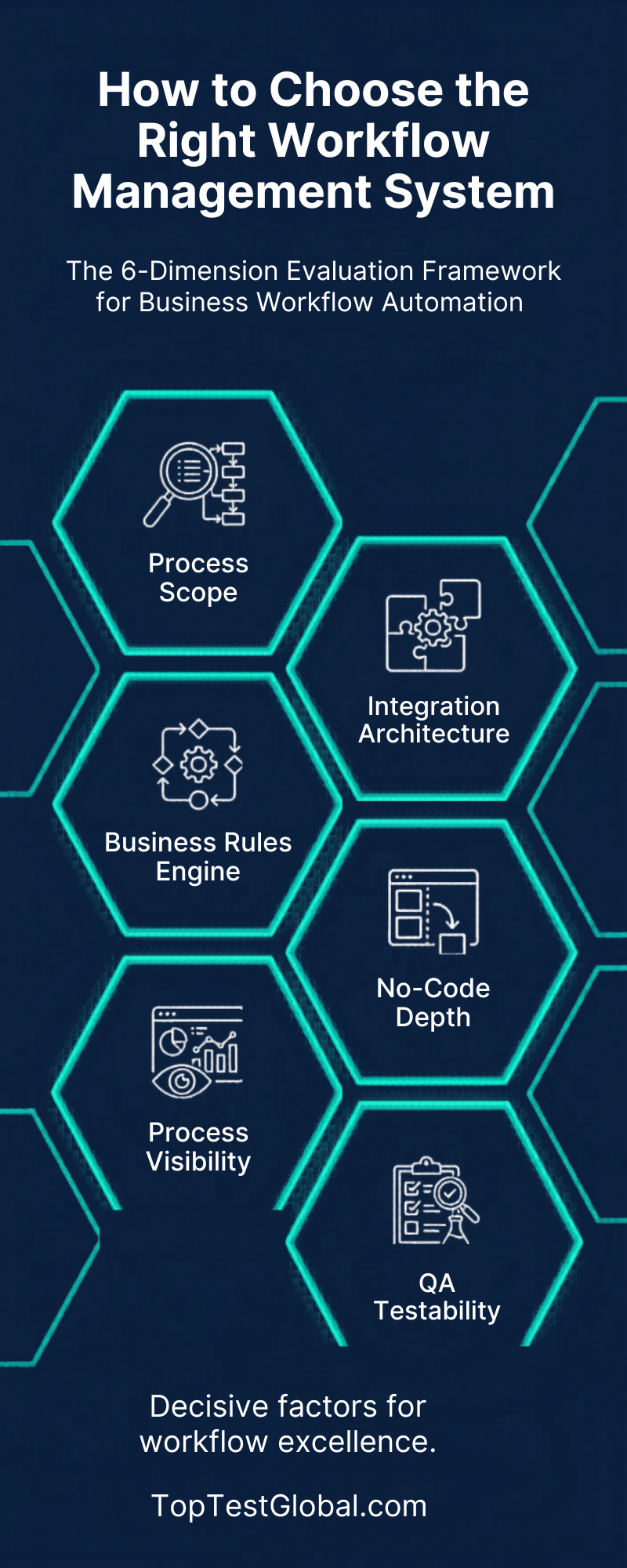
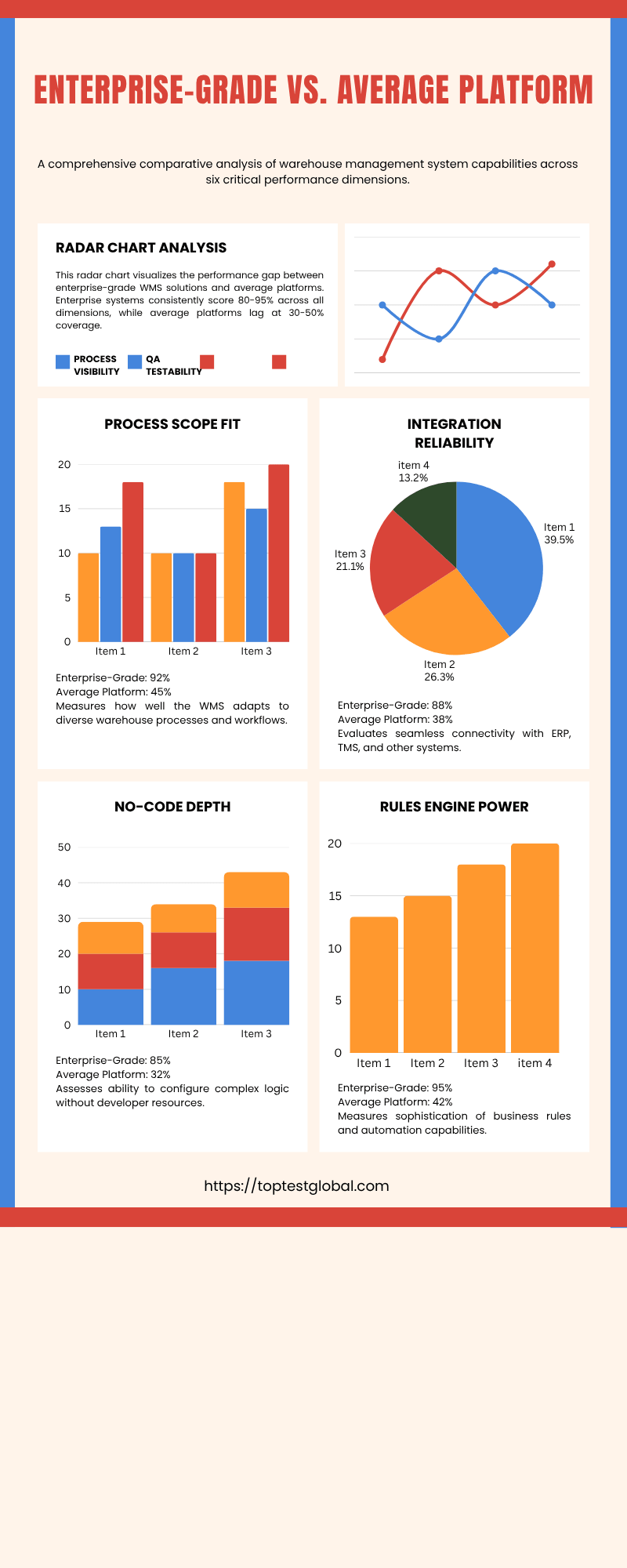
Based on our hands-on experience implementing QA-driven automation for clients across financial services, technology, and professional services, we use a structured six-dimension framework to evaluate any workflow management system before recommending it.
Dimension 1: Business Workflow Automation Scope and Process Complexity Fit
Not all workflow management systems are built for the same complexity tier. Some excel at simple, linear approval chains. Others are designed for multi-branch, exception-heavy enterprise workflows with conditional logic, parallel processing, and dynamic role assignment.
Before shortlisting any platform, map your target processes at the task level using BPMN process mapping — the international standard notation for business process documentation. BPMN mapping forces precision: you’ll identify every decision node, every exception path, and every integration point before you’ve spent a dollar on software. Platforms that cannot faithfully represent your BPMN-mapped processes in their workflow builder are immediately disqualified, regardless of how compelling the demo is.
Key questions to answer:
- Does the platform support parallel and conditional branching natively, without custom code?
- Can it handle dynamic approval routing based on runtime data (e.g., PO value, employee grade, cost center)?
- Does it support subprocess and nested workflow structures for complex multi-stage operations?
Dimension 2: Integration Architecture and API Reliability
A business workflow automation platform that can’t reliably exchange data with your existing tool stack is not an automation platform — it’s an island. Digital process automation at scale requires real-time, bidirectional integration with your CRM, ERP, HRIS, finance platforms, and communication tools.
Evaluate every candidate platform’s integration architecture with the same rigor you’d apply to any production system:
- Native connectors vs. webhook-only: Native connectors handle schema changes and authentication refresh automatically; webhooks require constant maintenance
- Error handling and retry logic: What happens when an integrated system is temporarily unavailable? Does the workflow pause, fail silently, or alert and retry?
- API rate limit management: For high-volume automation, does the platform handle rate limiting gracefully or does it drop requests under load?
- Middleware compatibility: For organizations with heterogeneous tool stacks, platforms with strong n8n integration support or native middleware layers significantly expand your integration options without vendor lock-in
In our project experience, integration failures account for the majority of production automation outages. This dimension deserves more evaluation time than any other in your business workflow automation assessment.
Dimension 3: No-Code/Low-Code Capability — Real vs. Marketing
Every business workflow automation vendor claims no-code capability. Very few deliver it beyond the simplest use cases. The question is not whether a platform has a visual workflow builder — they almost all do. The question is how deep that no-code capability actually reaches before you hit a wall that requires developer intervention.
Test no-code depth by building a representative real-world workflow during your evaluation — not a demo scenario the vendor has pre-configured, but an actual process from your operations: an automated purchase order approval workflow with multi-tier routing, a budget check integration, and an escalation path for missed SLAs. If the vendor’s no-code builder requires a developer to complete it, you’ve found the ceiling.
Strong no-code/low-code workflow automation platforms like Cflow are purpose-built for exactly this requirement — enabling operations teams to build and modify complex approval workflows, manage conditional routing, and configure SLA rules entirely without engineering involvement. This is not a minor convenience; it directly determines how agile your automation program can be as business processes evolve.
Dimension 4: Business Rules Engine Depth
The business rules engine is what gives a business workflow automation system its intelligence. It governs the conditional logic that determines how automated workflows behave when real-world variability enters: different approval thresholds, exception routing, escalation triggers, compliance checkpoints, and dynamic data-driven decisions.
A shallow rules engine forces you to hardcode logic into workflow configurations — which means every business rule change requires a workflow rebuild and redeployment. A powerful rules engine decouples logic from workflow structure, allowing business owners to modify rules without touching the underlying automation.
Evaluate specifically:
- Can rules be managed by business analysts without developer support?
- Does the engine support real-time data lookups (e.g., checking live ERP data to validate a purchase limit)?
- Is there a rule versioning and audit trail for compliance purposes?
- Can rules be tested independently before deployment — without running the full workflow?
Dimension 5: Process Visibility, Monitoring, and Analytics
A business workflow automation platform that runs processes without giving you meaningful visibility into those processes is operationally blind. For business workflow automation to deliver sustained ROI, you need real-time process intelligence: where are tasks sitting right now? Which workflows are breaching SLAs? What is the end-to-end cycle time for each process type? Where are the exceptions concentrating?
The monitoring and analytics capabilities of your WMS determine whether you can continuously improve your automation program — or whether you’re flying blind and reacting to problems only after they become visible to clients or leadership.
Must-have monitoring features for any serious automation deployment:
- Real-time workflow status dashboards with task-level granularity
- SLA tracking with automated alerts and escalation triggers
- Bottleneck identification — which steps have the highest average dwell time?
- Exception and error rate reporting by workflow and integration
- Historical throughput data for capacity planning and ROI reporting
Dimension 6: QA Integration — The Business Workflow Automation Testability Requirement
This is the dimension that almost every WMS evaluation ignores — and it’s the one that determines whether your automation stays reliable at scale.
At Toptest Global, our QA-driven automation philosophy is built on one foundational observation from our 100+ projects: automated workflows that are not rigorously tested before and after deployment will fail — silently, at scale, and at the worst possible moment. Every integration point is a potential failure. Every business rule change is a regression risk. Every system update from a connected platform is a potential breaking change.
When evaluating a workflow management system, ask:
- Does the platform expose a testing environment that mirrors production?
- Can individual workflow steps be tested in isolation without triggering the full workflow?
- Does it support webhook simulation for testing integration endpoints without live system dependencies?
- Is there an API or CLI that enables automated test execution as part of a CI/CD pipeline?
- For any web-based workflow components, can Playwright automation tests validate UI behavior after each deployment?
Platforms that score well on dimensions 1–5 but score poorly on dimension 6 are a liability. You’ll get a workflow management system that looks good — until it doesn’t. And when it fails, you won’t know about it until the damage is done.
The WMS Comparison Matrix: What Separates Enterprise-Grade from Mid-Market Platforms
To make these evaluation dimensions actionable, here is a feature comparison framework across the capability tiers most relevant to enterprise and scaling mid-market organizations. Use this as your internal scorecard during vendor evaluation.
| Capability | Must Have | Good to Have | Red Flag if Missing |
|---|---|---|---|
| BPMN process mapping support | Native BPMN 2.0 import/export | Built-in BPMN modeler | No standard format support |
| Visual workflow builder | Drag-and-drop, no-code for core logic | Real-time collaboration editing | Requires developer for all changes |
| Business rules engine | Configurable by business users | Rule versioning and audit trail | Rules hardcoded into workflow |
| Integration layer | Native connectors + REST API | n8n/middleware compatibility | Webhook-only with no error handling |
| QA and testability | Staging environment, step isolation | CI/CD pipeline integration | No test environment available |
| Process monitoring | Real-time dashboards, SLA alerts | Bottleneck analytics, throughput reports | No task-level visibility |
| Compliance and audit | Full process audit trail | Role-based access controls | No audit logging |
| Scalability | Proven at 10,000+ workflow instances/month | Multi-region deployment support | No published scale benchmarks |
High-Impact Use Cases: Where Business Workflow Automation Delivers the Fastest ROI
The right workflow management system doesn’t deliver abstract value — it delivers measurable operational improvement in specific, high-volume process categories. These are the use cases where we consistently see the strongest ROI in our client engagements:
Automated Employee Onboarding With Business Workflow Automation
Automated employee onboarding is the most universally impactful first use case for any WMS deployment. A manual onboarding process involves 20–40 discrete tasks spanning IT provisioning, payroll configuration, compliance documentation, benefits enrollment, and manager notifications — executed across multiple departments with no central coordination.
A properly configured workflow management system triggers the entire sequence automatically from a single HRIS status change. IT receives provisioning requests instantly. Payroll is updated. Compliance documents are routed for e-signature. The new hire receives a sequenced onboarding task checklist. Every step is logged for audit. No emails. No spreadsheets. No dropped tasks.
Typical results: Onboarding completion time reduced from 3–5 business days to under 4 hours. HR team capacity freed from coordination tasks and redirected to retention and culture initiatives.
HR Process Automation at Scale With Business Workflow Automation
Beyond onboarding, HR process automation covers a broad category of high-volume, rules-driven workflows: leave approval and balance tracking, performance review cycles, offboarding and asset recovery, compliance training assignments, and salary change approvals.
Each of these is a strong WMS use case because the underlying logic is well-defined, the volume is high, and the cost of errors — particularly in compliance or payroll — is significant. A workflow management system with a strong business rules engine handles the conditional logic (different approval chains for different employee bands, escalation for extended leave, automatic offboarding checklists triggered by termination dates) without requiring manual routing decisions.
Automated Purchase Order Approval
Automated purchase order approval workflows eliminate one of the most persistent sources of financial process friction. Multi-tier approval routing based on PO value, vendor category, cost center, and budget availability — with escalation for missed SLA windows and ERP posting upon final approval — is a textbook workflow automation use case.
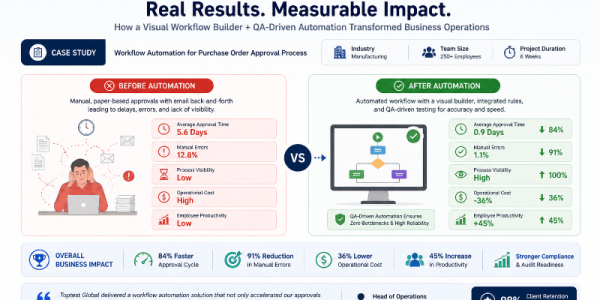
The ROI is direct and measurable: procurement cycle times fall, budget overruns from unapproved spend are eliminated, and the finance team gains a real-time view of pending commitments. For our clients, automating purchase order approval is often the process that converts skeptics into advocates for the broader automation program — because the before/after difference is undeniable.
For a deeper framework on how to structure and implement these workflows, our guide on business process automation covers the end-to-end implementation approach in detail.
Client Onboarding Automation
Client onboarding automation is critical for professional services, SaaS, fintech, and consulting firms where the speed and quality of the onboarding experience directly shapes client retention. A slow, manual onboarding process signals operational immaturity at exactly the moment when the client relationship is most impressionable.
A workflow management system purpose-built for client onboarding automates: KYC/AML document collection and verification routing, CRM record creation and stakeholder assignment, contract generation and e-signature sequencing, project kickoff notifications, resource allocation, and welcome communication sequences — all triggered automatically and tracked with full audit visibility.
Process Automation in Software Project Management
Process automation in software project management is an area where Toptest Global brings unique cross-functional expertise. Software development lifecycles involve hundreds of repeatable process steps: sprint planning triggers, code review routing, test execution scheduling, defect escalation workflows, release approval chains, and deployment notification sequences.
Automating these workflows eliminates the coordination overhead that slows engineering teams — and when combined with software QA automation and automated QA testing software, it creates a delivery pipeline where quality gates run automatically at every handoff, not as a final gate before release.
Why QA-Driven Business Workflow Automation Is the Only Reliable Path to Zero Bottlenecks
Here is the insight that the workflow automation industry consistently underemphasizes: a workflow management system that runs without rigorous QA is not an automation program — it’s a risk amplifier.
Manual processes fail occasionally, visibly, and recoverably. Automated processes fail systematically, silently, and at machine speed. When a misconfigured routing rule sends every purchase order above $10,000 to the wrong approver, it doesn’t happen once — it happens to every PO in that category until someone notices. When an integration breaks between your WMS and your HRIS, automated employee onboarding doesn’t slow down — it stops entirely, with no alert, while new hires wait for access that never arrives.
This is why every WMS deployment at Toptest Global is anchored in what we call QA-driven workflow automation: the practice of treating automated workflows as software artifacts that require the same testing discipline as any production application.
What QA-Driven Business Workflow Automation Looks Like in Practice
In our project delivery model, QA integration is not a final phase — it is a continuous discipline embedded from the first workflow design session:
- Pre-deployment scenario testing: Every workflow is tested against a complete scenario library — happy path, edge cases, exception paths, and failure states — before any go-live
- Integration validation: Every API connection and data exchange is tested for schema compliance, latency, error response handling, and retry behavior
- Business rules testing: Every rule configuration is tested independently against all relevant input conditions before it governs live workflow behavior
- Regression test suites: When workflows change — because business rules evolve, integrations update, or new steps are added — automated regression tests run immediately to catch regressions before they reach production
- UI-layer validation with Playwright: For any web-facing workflow components — approval portals, client onboarding interfaces, self-service dashboards — we deploy Playwright automation test suites that validate UI behavior after every deployment
Playwright — Microsoft’s enterprise-grade end-to-end testing framework — gives our QA engineers the ability to simulate real user interactions across browsers and validate that every web-based workflow component behaves exactly as designed, continuously, as the underlying systems evolve.
This is the foundation of zero-bottleneck automation: not just workflows that are automated, but workflows that are validated, monitored, and governed to stay reliable under real-world conditions.
Step-by-Step: How to Evaluate and Select Your Business Workflow Automation Platform
With the framework and criteria established, here is the practical business workflow automation evaluation process we recommend — refined across dozens of WMS selection engagements:
Step 1: Build Your Process Inventory
Before you open a single vendor website, create a prioritized inventory of your target automation processes. For each process, capture: transaction volume per month, average time-per-instance today, number of systems involved, exception frequency, and the cost of an error. This inventory will drive every subsequent business workflow automation evaluation decision — and it will tell you immediately which use cases should be in your pilot scope.
Step 2: Define Your Business Workflow Automation Non-Negotiable Requirements
Translate your process inventory into a non-negotiable requirements list. Typical non-negotiables include: specific system integrations that must work natively, minimum no-code capability depth for your operations team, compliance and audit trail requirements, and scale thresholds (minimum transactions per month the platform must handle without degradation).
Any business workflow automation platform that cannot meet your non-negotiables is eliminated regardless of other merits. This discipline keeps your evaluation focused and prevents vendor demo enthusiasm from overriding operational requirements.
Step 3: Shortlist and Issue a Structured RFP
With non-negotiables defined, shortlist three to five platforms. Issue a structured RFP that includes your BPMN process maps, integration requirements, scale benchmarks, and QA testability requirements. Ask for specific technical responses — not marketing materials. Require vendors to demonstrate their platform against your actual process scenarios, not their own demo environments.
Step 4: Run a Business Workflow Automation Proof of Concept on a Real Process
The proof of concept (PoC) phase is where most business workflow automation platform decisions are actually made. Assign a real, representative process from your priority list — not a simplified demo version, but the actual process with all its complexity, exceptions, and integration dependencies. Build it in the vendor’s platform with your team, not theirs.
During the PoC, apply the six evaluation dimensions rigorously. Pay particular attention to dimension 6 (QA and testability): can you build a test harness for this workflow? Can you validate the integration behavior? Can you run regression tests after making a rule change?
Step 5: Validate Your Business Workflow Automation With Production-Readiness Testing
Before any platform goes live, run a full production-readiness test suite. This includes load testing at 2x your expected peak transaction volume, failure mode testing (what happens when each integrated system goes down?), data validation testing across all integration endpoints, and end-to-end scenario testing of every workflow variant. For web-facing components, run Playwright-based UI tests across all supported browsers.
Business workflow automation platforms that cannot support this level of pre-production validation are not enterprise-ready — regardless of what the sales deck says.
Step 6: Establish Business Workflow Automation Governance Before You Go Live
Automated workflows are production software. They require the same governance discipline: version control, change approval processes, documentation standards, owner assignment, and incident response procedures. Establish these before go-live, not after. Our comprehensive guide on how to automate workflows for zero bottlenecks covers the business workflow automation governance framework in detail — including the change management protocols we use in our own project delivery.
BPM Software vs. Standalone WMS: Choosing the Right Business Workflow Automation Architecture
One of the most consequential decisions in your WMS selection is whether you need a full BPM software suite or a purpose-built workflow management system. The distinction has real operational and cost implications.
BPM software suites provide an integrated platform for process modeling, simulation, execution, monitoring, and governance. They’re comprehensive — and correspondingly complex and expensive. They’re the right choice for large enterprises with dedicated process management teams, complex multi-system orchestration requirements, and a mandate for organization-wide process governance.
Workflow management software — focused, purpose-built platforms — delivers faster time-to-value, lower implementation complexity, and lower total cost of ownership for organizations with defined automation use cases and operational teams that need to own their workflows without heavy IT involvement.
The right answer depends entirely on your process complexity, team capabilities, integration landscape, and long-term automation roadmap. What’s consistently wrong is defaulting to the most feature-rich option because it seems “safer” — full BPM suites deployed to organizations that don’t need their complexity generate the most expensive abandoned business workflow automation projects we encounter.
For a foundational understanding of where business process automation fits in this architecture decision, see our complete guide on business process automation — which maps the full technology landscape from task automation through enterprise BPM.
Implementation Best Practices: Avoiding the Most Common Business Workflow Automation Deployment Failures
Selecting the right platform is necessary but not sufficient. Deployment execution determines whether your business workflow automation investment translates into operational results. These are the practices that consistently separate successful WMS deployments from expensive shelfware:
Start Your Business Workflow Automation With One High-Volume Process, Not Everything at Once
The temptation to automate everything simultaneously is understandable — but it’s the most reliable path to a failed business workflow automation program. Start with one high-volume, rules-based, low-exception process. Build it right. Validate it thoroughly. Measure the results. Let that success build organizational confidence and refine your deployment methodology before expanding scope.
Co-Design Business Workflow Automation With the People Who Run the Processes
Business workflow automation designed without the input of the operations teams who run the underlying process will have blind spots — exception paths that weren’t anticipated, approval logic that doesn’t match real-world practice, integration requirements that weren’t surfaced during scoping. Co-design with process owners surfaces these gaps before they become production failures.
Never Deploy Business Workflow Automation Without a Full Test Pass
Based on our hands-on experience delivering QA-driven automation, this is the single most violated deployment practice. Time pressure, stakeholder eagerness, and vendor go-live enthusiasm consistently create pressure to skip or compress testing. Resist it. An untested business workflow automation deployment in production is categorically more dangerous than the manual process it replaced — because it fails silently and at scale.
Monitor Your Business Workflow Automation From Day One
Deploy your business workflow automation with live monitoring active from the first production transaction. Set SLA alert thresholds, error rate monitors, and integration health checks before go-live. The first 30 days of production operation surface edge cases that even rigorous testing misses — and you want to catch them in real time, not in a monthly exception report.
Plan Your Business Workflow Automation for Change From Day One
Business workflow automation deployed today will need to change — because business rules evolve, systems update, team structures shift, and regulatory requirements change. Your WMS governance model must account for this from the start: how will changes be requested, reviewed, tested, and deployed? Who owns each workflow? What’s the rollback procedure if a change causes a regression? These questions answered before deployment prevent operational chaos later.
The ROI of Getting Your Business Workflow Automation Platform Selection Right
The operational and financial case for selecting and implementing the right business workflow automation platform is compelling — and measurable. Across our client portfolio, organizations that deploy the right business workflow automation platform with QA-driven rigor consistently achieve:
- 60–80% reduction in process cycle times for high-volume workflows like onboarding, procurement, and client intake
- 85–95% reduction in manual data entry errors across integrated process workflows
- 30–50% reduction in operational costs for automatable process categories over a 12–18 month horizon
- Significant compliance improvement — full process audit trails and automated policy enforcement reduce compliance risk and audit preparation time
- Improved employee experience — teams freed from coordination and data entry overhead report measurably higher engagement and focus on strategic work
- 98% client retention rate at Toptest Global — a direct result of the operational discipline we bring to every automation engagement, including the QA rigor that keeps automation performing reliably long after go-live
The organizations that achieve these results share a common characteristic: they didn’t just select a workflow management system. They built a business workflow automation discipline — starting with honest process mapping, rigorous platform evaluation, QA-driven deployment, and governance that treats automated workflows with the same seriousness as any other production system.
Conclusion: Business Workflow Automation That Actually Performs
Selecting the right business workflow automation platform and workflow management system is one of the highest-leverage technology decisions an operations or IT leader makes. The wrong choice generates technical debt, integration failures, and business workflow automation programs that plateau well below their potential. The right choice — selected with a disciplined evaluation framework, deployed with QA rigor, and governed as a production system — delivers measurable operational transformation that compounds over time.
Business workflow automation at its best is not just faster processes — it’s reliable processes. Processes that run the same way every time, that surface exceptions immediately, that integrate cleanly with the systems around them, and that can be tested, monitored, and improved as your business evolves. That’s what the right workflow management system, deployed with the right QA discipline, actually delivers. And that’s the standard every automation investment should be held to.
At Toptest Global, we bring that standard to every engagement — for clients who need an experienced partner to close the gap between automation ambition and operational reality.
Ready to Select and Deploy the Right Workflow Management System?
Book a Free 45-Minute Automation & QA Audit
Our senior automation strategists will analyze your top process bottlenecks, evaluate your current or candidate WMS against our 6-dimension framework, and map a QA-driven implementation path — at no cost and no obligation.
Frequently Asked Questions
What is a workflow management system and how does it differ from basic task automation?
A workflow management system (WMS) is a business workflow automation software platform that orchestrates complete end-to-end business processes — routing tasks, managing approvals, integrating data across systems, and enforcing business rules — with minimal human intervention. Unlike basic task automation, which handles isolated single-step actions, a WMS manages the full process lifecycle: from trigger to completion, across multiple systems, stakeholders, and conditional paths. The distinction matters because business workflow automation at scale requires process-level orchestration, not just individual task shortcuts.
What is the most important factor when choosing a workflow management system?
Based on our experience across 100+ automation and QA projects, the most underweighted factor in WMS selection is QA testability — whether the platform can support rigorous pre-deployment testing, integration validation, and automated regression testing as workflows evolve. Most teams over-index on feature checklists and visual workflow builder quality during business workflow automation evaluations. These matter, but they’re recoverable limitations. Deploying automation without a QA layer creates production failures that are far more expensive to remediate than they would have been to prevent.
How long does a workflow management system implementation typically take?
Implementation timelines vary by process complexity and scope. A focused single-process business workflow automation deployment — for example, an automated purchase order approval workflow or an automated employee onboarding sequence — can go from design to production in 4–8 weeks with an experienced team and a clearly scoped process. Enterprise-wide WMS programs spanning multiple process categories and system integrations typically run 3–6 months for initial deployment, with ongoing expansion as additional processes are automated. QA-driven deployments take slightly longer in the test phase — and significantly less time in post-go-live remediation.
Should we use a full BPM software suite or a standalone workflow management system?
The answer depends on your organization’s process complexity, team capabilities, and automation scope. Full BPM software suites deliver comprehensive process governance and are appropriate for large enterprises with dedicated process management teams and complex, organization-wide automation mandates. Purpose-built workflow management software delivers faster time-to-value and lower implementation complexity for organizations with defined use cases and operations teams that need to own their workflows without heavy IT dependency. In our experience, the most common expensive mistake is deploying a full BPM suite to an organization that needs a focused WMS — the complexity overhead stalls the program before it delivers value.
How does Playwright fit into a workflow management system deployment?
Playwright is an enterprise-grade end-to-end browser testing framework that validates the behavior of web-facing workflow components — approval portals, client onboarding interfaces, self-service dashboards, and any other UI that end users interact with as part of an automated workflow. In our QA-driven business workflow automation deployments, Playwright test suites run after every workflow deployment to confirm that UI behavior is correct across browsers. This is particularly important for workflows where a broken UI element can stall an entire process — for example, an approval button that stops rendering correctly after a platform update, causing all pending approvals to pile up silently.
What processes should we automate first with a new workflow management system?
Start with processes that combine high transaction volume, clear rules-based logic, and measurable manual effort per instance. Automated employee onboarding, purchase order approval, and client onboarding automation are consistently the strongest first deployments — they have clear before/after metrics, manageable integration complexity for a first deployment, and high visibility across the organization. Avoid starting with exception-heavy, highly variable processes that require significant judgment — these are better candidates for automation once your WMS deployment discipline is proven on simpler use cases.