Disclosure: Toptest Global is an official Cflow partner in Southeast Asia. We provide implementation, migration, and QA services for workflow automation platforms. This guide reflects our independent hands-on experience across 100+ automation and QA projects in Singapore and Hanoi.
Finding the best workflow automation software for your business is not about picking the most popular brand. It is about matching platform architecture to your team size, technical capacity, and process complexity. In this guide, we cut through marketing noise and compare the top platforms side by side. Whether you need no-code business process automation, enterprise app development, or university document management, we show you exactly which tool fits which model.
Ready to explore your options? Let us dive into the best workflow automation software for 2026.
What Makes the Best Workflow Automation Software?
Before comparing platforms, you need a clear framework. In our 100+ projects, we have seen teams choose the wrong tool because they prioritized price over fit. The best workflow automation software for your organization must satisfy four criteria.
Ease of use: Business users should build and modify workflows without filing IT tickets.
AI and intelligence: Native OCR, AI Agents, and automated summaries reduce manual work.
Deployment speed: Time-to-value under one month, not one quarter.
QA and compliance: Audit trails, role-based access control, and validation-ready architecture.
Learn more about building scalable automation in our Low-Code Workflow Automation Ultimate Scalable Guide.
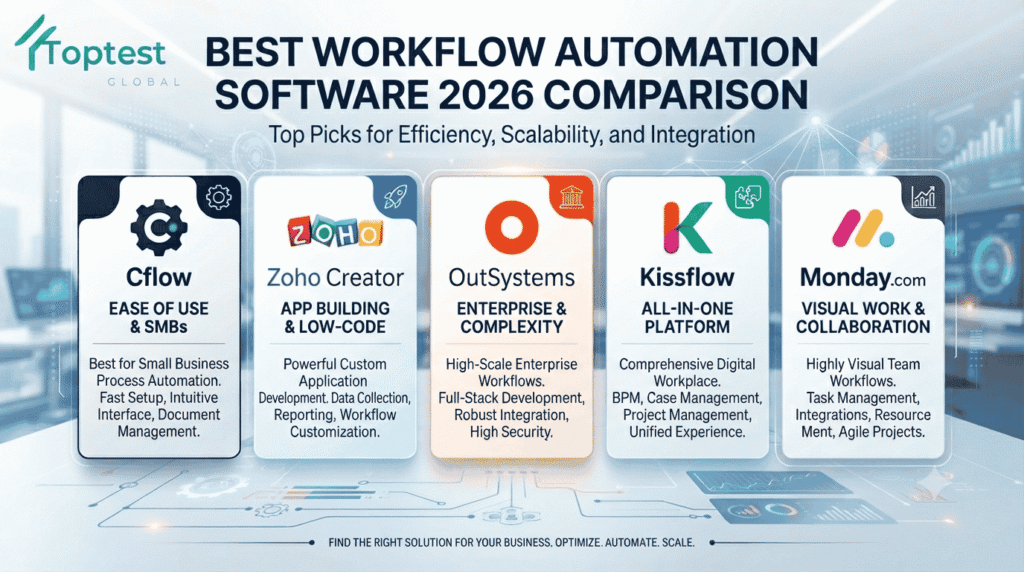
The 5 Best Workflow Automation Software for 2026
Here are the top platforms we evaluate for clients. Each excels in a specific business model. There is no single winner — only the right fit.
1. Cflow — Best for No-Code Business Process Automation
Cflow is a dedicated no-code/low-code workflow automation platform built specifically for business process automation. It is not a generic app builder. Every feature centers on visual workflow design, AI-native automation, and rapid deployment.
Why it stands out:
- Native OCR: Extracts data from invoices, receipts, and forms without third-party integration.
- AI Agents for business users: Automate routine tasks and assist decision-making without developer setup.
- AI Workflow Summaries: Instant visibility into approval histories, bottlenecks, and pending actions.
- AI Insights: Proactive recommendations for process optimization.
- True visual workflow builder: Drag-and-drop complex approval chains, conditional branches, and escalations with zero scripting.
- Fast deployment: Average go-live under 4 weeks; we have seen HR and procurement workflows deployed in under 48 hours.
- Low developer dependency: Business users own their workflows end-to-end.
Best for: Mid-market companies, universities, HR teams, procurement departments, and any organization that needs automated purchase order approval, automated employee onboarding, or client onboarding automation without IT bottlenecks.
Start here: Cflow Free Trial — No Credit Card Required
2. Zoho Creator — Best for Custom App Development Within the Zoho Ecosystem
Zoho Creator is a low-code application development platform that includes workflow capabilities as part of a broader app-building suite. It shines when you need custom databases, forms, and logic tightly integrated with Zoho CRM, Zoho Books, and other Zoho products.
Why it stands out:
- Deep Zoho integration: Native connections across the Zoho ecosystem.
- Deluge scripting: Powerful proprietary language for developers who need advanced customization.
- AI via Zia: OCR, sentiment analysis, and keyword extraction available through the Zia AI Modeler.
- Flexible app building: Ideal for teams that need custom internal tools beyond pure workflow routing.
Trade-offs: Advanced workflows typically require Deluge scripting. AI features need configuration. Business users often need IT support for workflow changes. Deployment timelines extend when logic grows complex.
Best for: Organizations already embedded in the Zoho ecosystem that need custom applications with basic workflow features.
Explore: Zoho Creator Official Site
3. OutSystems — Best for Enterprise Application Development
OutSystems is an enterprise low-code platform for building full-scale applications. Workflow automation is one capability among many. It is designed for large organizations with dedicated IT teams and complex governance requirements.
Why it stands out:
- Enterprise-grade scalability: Built for Fortune 500 complexity and security.
- Full application development: Not just workflows — entire custom enterprise apps.
- Comprehensive low-code ecosystem: Extensive tools for developers and architects.
Trade-offs: High developer dependency. AI features require developer-led setup. No native OCR out of the box — requires integration. Deployments typically run 2–3 months. Licensing is enterprise-grade, which can exceed the budget of mid-market teams focused purely on business process automation.
Best for: Large enterprises building complex, custom applications from scratch with dedicated developer resources.
4. Kissflow — Best for Mid-Market Digital Operations
Kissflow is a digital workplace platform combining workflow automation, case management, and project collaboration. It sits between pure BPM tools like Cflow and enterprise suites like OutSystems.
Why it stands out:
- Unified digital workplace: Workflow, project, and case management in one interface.
- Low-code app development: More flexible than pure workflow tools for teams that need light custom apps.
- Strong mid-market focus: Pricing and features calibrated for growing organizations.
Best for: Mid-market companies that want workflow automation plus project management in a single platform.
5. Monday.com — Best for Visual Work Management with Light Workflow
Monday.com is a work operating system known for visual project management. Its workflow automation features handle notifications, status updates, and cross-board dependencies.
Why it stands out:
- Intuitive visual interface: Teams adopt quickly with minimal training.
- Strong project-workflow hybrid: Ideal for marketing, creative, and operations teams.
- Extensive integrations: Connects easily with Slack, Gmail, Zoom, and hundreds of other tools.
Best for: Teams that need project management first and light workflow automation second.
Head-to-Head Comparison: Best Workflow Automation Software by Feature
The best workflow automation software for your team depends on which features you need on day one. Here is how the top platforms compare.
| Feature | Cflow | Zoho Creator | OutSystems | Kissflow | Monday.com |
|---|---|---|---|---|---|
| Primary Focus | Dedicated BPA & BPM | Custom app + workflow | Enterprise app dev | Digital workplace | Project + workflow |
| Native OCR | Yes | Via Zia AI | Requires integration | Limited | No |
| AI Agents | Business-user ready | Via Zia setup | Developer-led | Limited | Basic automation |
| AI Summaries | Pre-configured | Custom build | Custom build | Limited | No |
| AI Insights | Workflow-native | External analytics | BI-dependent | Dashboards | Basic reporting |
| No-Code Builder | Purpose-built for BPA | Visual + scripting | Developer-oriented | Low-code | Visual boards |
| Developer Dependency | Low | High for advanced | High | Medium | Low |
| Deployment Speed | Under 4 weeks | Moderate | 2–3 months | 4–6 weeks | 1–2 weeks |
| Business-User Access | Full autonomy | IT-supported | IT-dependent | Moderate | Full autonomy |
| Best Pricing Tier | Mid-market | Small to mid-market | Enterprise | Mid-market | Small to mid-market |
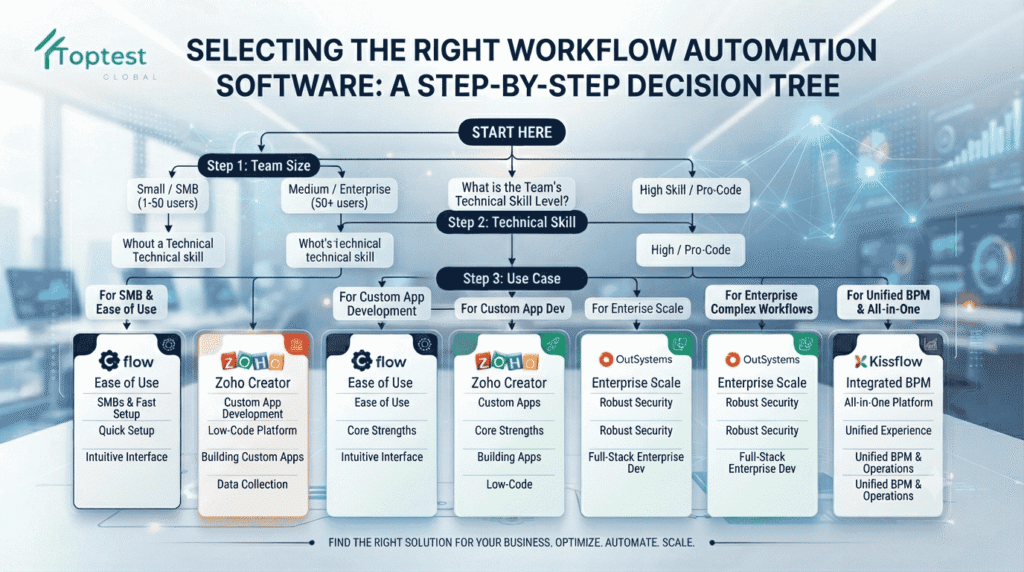
Our recommendation: Do not choose based on a feature table alone. Match the tool to your team’s technical capacity and your most critical use case.
Choosing the Best Workflow Automation Software by Business Model
Here is how we match the best workflow automation software to specific organizational models based on our 100+ implementation projects.
For Universities & Higher Education
Universities handle massive document volumes: admissions, transcripts, faculty hiring, research grants, and IRB ethics review. They need OCR, multi-level approval, and FERPA-compliant audit trails.
Our recommendation: Cflow. Native OCR handles admission forms and transcripts. The visual builder lets registrars and HR managers modify workflows without IT support. AI Summaries keep administrators informed across siloed departments.
For Manufacturing & Procurement
Manufacturing teams need automated purchase order approval, vendor onboarding, and invoice processing. Speed matters. Delays in procurement stop production lines.
Our recommendation: Cflow. Native OCR extracts invoice data automatically. Approval thresholds and routing logic are modified by procurement managers, not developers. We have seen turnaround drop from 5 days to under 24 hours.
For HR & People Operations
HR teams need HR process automation that adapts to policy changes, compliance updates, and seasonal hiring spikes. Employee onboarding, leave requests, and offboarding must be consistent and auditable.
Our recommendation: Cflow for dedicated HR automation. Kissflow is an alternative if you also need project management. Zoho Creator works if you already run Zoho People.
For Startups & Growth-Stage Companies
Startups need speed and low total cost of ownership. They cannot afford enterprise licensing or three-month implementation cycles.
Our recommendation: Cflow for BPA-first teams. Monday.com for project-centric teams. Zoho Creator for startups already using Zoho CRM.
For Enterprise IT Departments
Large enterprises building custom ERP modules, customer portals, or industry-specific applications need deep customization and governance.
Our recommendation: OutSystems. It is built for enterprise-scale application development. Just ensure you budget for developer resources and 2–3 month timelines.
The Hidden Cost of Choosing the Wrong Platform
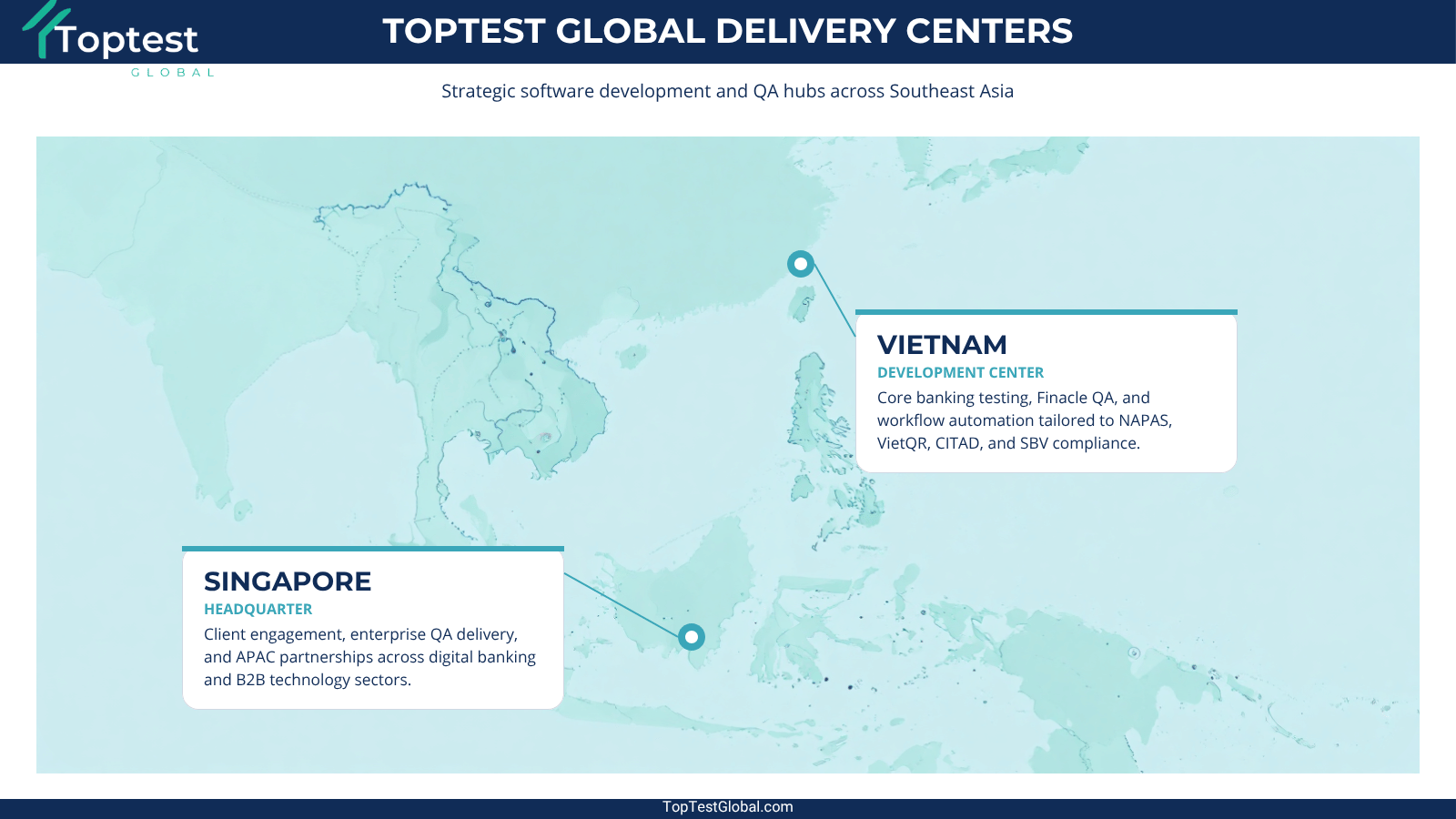
At our development centers in Singapore and Hanoi, we have rescued projects where teams chose a general-purpose tool for pure workflow needs. The pattern is always the same.
Month 1–2: Basic workflow works fine.
Month 3–6: Process changes require developer tickets. Backlogs grow.
Month 7–12: Workarounds multiply. Data integrity issues emerge. Software QA automation reveals regression bugs.
Year 2: The team is maintaining a fragile custom application instead of running automated processes.
This is why we advocate for QA-driven workflow automation. When you combine the best workflow automation software with rigorous automated QA testing software practices — such as Playwright automation for end-to-end validation — you achieve true zero-bottleneck automation.
How to Evaluate the Best Workflow Automation Software Risk-Free
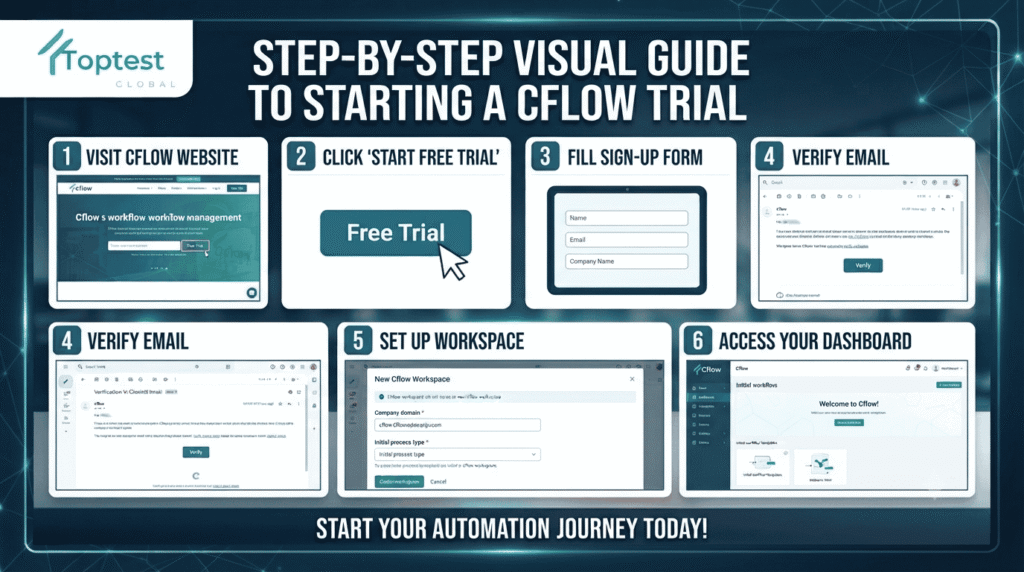
The fastest way to find your fit is hands-on testing. Here is how to evaluate Cflow, one of the most accessible options on this list.
Step 1: Visit cflowapps.com/signup-top-test — no credit card required.
Step 2: Enter your business details and choose a pre-built template for automated purchase order approval, HR process automation, or client onboarding automation.
Step 3: Customize visually using the drag-and-drop builder. Set approval rules and assign users.
Step 4: Run a live test. Submit a request and watch the workflow route, notify, and escalate automatically.
Most of our clients have a functioning prototype within 30 minutes. That is the power of a purpose-built platform.
Why Toptest Global Recommends QA-Driven Implementation
Our 98% client retention rate is not accidental. It stems from our insistence that process automation in software project management must be paired with rigorous quality assurance. Even the best workflow automation software fails without proper testing.
We recommend three non-negotiable practices. First, apply automated QA testing software validation for every workflow branch and edge case. Second, use Playwright automation for end-to-end testing of user-facing approval portals. Third, maintain continuous monitoring through AI Insights or equivalent analytics to prevent silent failures.
Automation that breaks silently is more dangerous than no automation at all. This is the Toptest Global difference.
Final Verdict: Which Is the Best Workflow Automation Software for You?
There is no universal winner. The best workflow automation software is the one that matches your business model, team capacity, and process complexity.
Choose Cflow if you need dedicated no-code business process automation with native OCR, AI, and rapid deployment. Choose Zoho Creator if you are building custom apps within the Zoho ecosystem. Choose OutSystems if you are developing enterprise-scale applications with dedicated IT. Choose Kissflow for a mid-market digital workplace. Choose Monday.com for visual project management with light automation.
Still unsure? The fastest way to validate is to test. Start your free Cflow trial today and experience how purpose-built workflow automation feels in your first process.
Frequently Asked Questions
What is the best workflow automation software for small businesses?
For small businesses with no dedicated IT team, Cflow and Monday.com are the most accessible. Cflow offers deeper BPA capabilities like native OCR and complex approval chains. Monday.com excels for project-centric teams.
Is Cflow truly no-code?
Yes. The vast majority of workflows — including automated employee onboarding, purchase approvals, and HR processes — can be built entirely through the visual workflow builder without writing a single line of code.
How does Zoho Creator compare to Cflow for workflow automation?
Zoho Creator is a custom app builder with workflow add-ons. It excels when you need tailored applications integrated with Zoho CRM. Cflow is purpose-built for business process automation and typically deploys faster for approval-heavy workflows.
How long does workflow automation software take to deploy?
It depends on the platform. Cflow averages under 4 weeks. Monday.com can go live in 1–2 weeks. OutSystems typically requires 2–3 months. The key factor is whether your team needs custom scripting.
Can workflow automation software handle university admissions?
Yes. Platforms with native OCR and multi-level approval — like Cflow — are ideal for university admissions, transcript verification, and faculty hiring workflows.
Why should I hire a QA partner for workflow automation?
Because automation without validation is a liability. Our software QA automation and Playwright automation services ensure your workflows behave correctly under edge cases, load, and change.
Ready to Choose the Best Workflow Automation Software?
Finding the best workflow automation software is only the first step. Implementing it with QA rigor is what delivers ROI. At Toptest Global, we help organizations across APAC select, test, and optimize automation platforms that actually scale.
Primary CTA: Start Your Free Cflow Trial — No Credit Card Required
Secondary CTA: Book a Free 45-Minute Automation & QA Audit — and let our experts match the right platform to your specific processes.
Resource CTA: Download Our Low-Code Workflow Automation Scalable Guide for a deeper dive into future-proof automation architecture.